Here’s the thing. Receipts are weirdly satisfying. They slide out, they have that $jagged$ edge, they feel like tiny physical proof that something happened. I decided to make a bottom sheet behave like a tiny receipt printer. Inspired by a post I saw on design spells. Pure chaos. But it turned out fun, and now you get to learn it without dealing with my debugging tears. Let’s walk through it.
What We’re Building
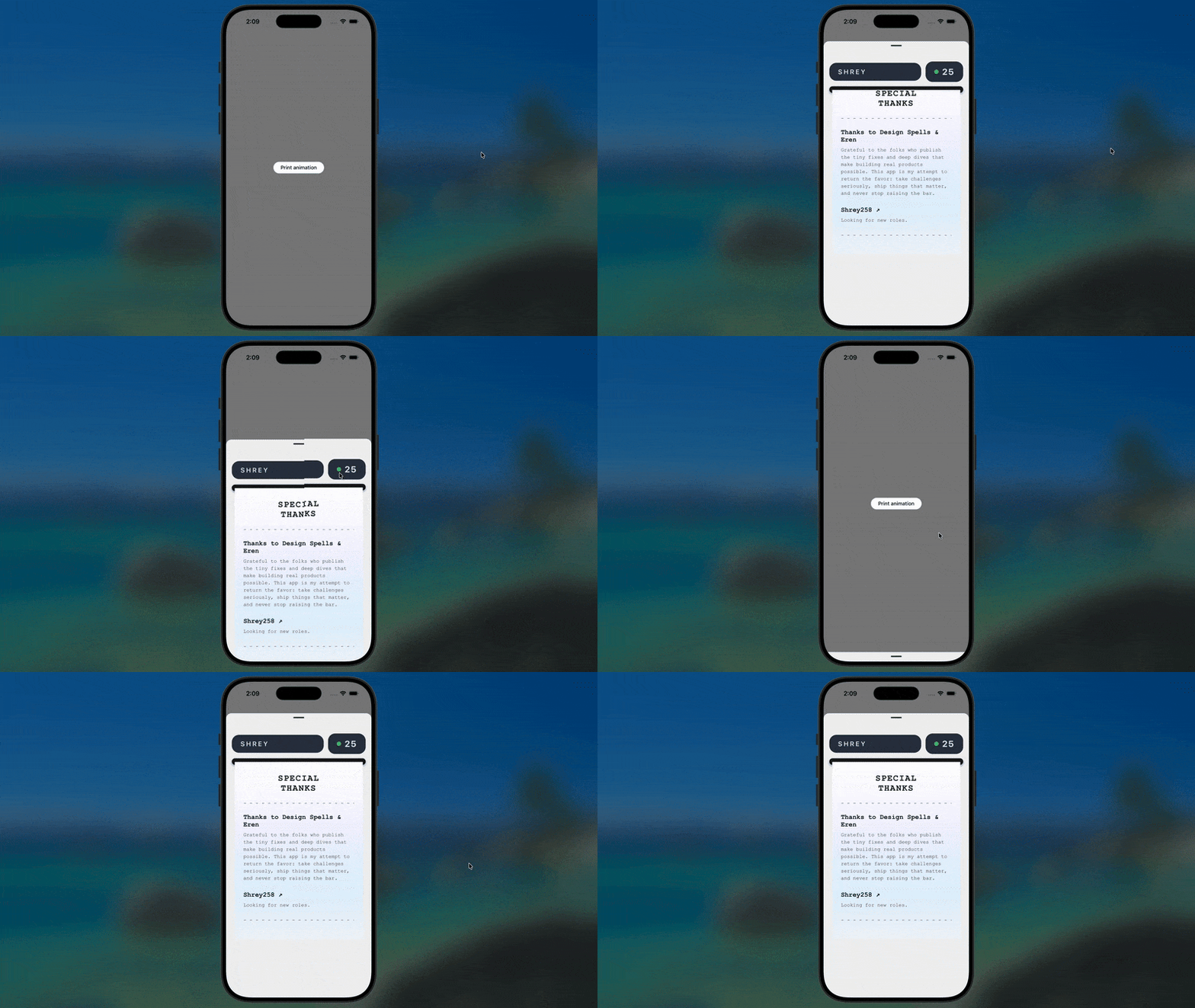
Tap a button → Bottom sheet rises →
A receipt dramatically slides out of a fake slot like it’s printing your destiny(lmao).No machine. No paper. Just vibes.
💡The core trick is simple: translateY + overflow hidden. The rest is polish.
Step 1: Get the playground ready
Bottom sheets need gesture handling. Gesture handling needs wrapping. I just wanted to let you know that wrapping needs you not to break things.
tsximport { Stack } from "expo-router";
import { GestureHandlerRootView } from "react-native-gesture-handler";

export default function RootLayout() {
  return (
    <GestureHandlerRootView style={{ flex: 1 }}>
      <Stack screenOptions={{ headerShown: false }} />
    </GestureHandlerRootView>
  );
}
💡 Great. The app now supports “finger go brr.”
Step 2: The main screen that triggers all the chaos
This is the part where you pretend you’re building something serious. A button. A bottom sheet. That’s it.
tsximport BottomSheet, { BottomSheetView } from "@gorhom/bottom-sheet";
import { useCallback, useMemo, useRef, useState } from "react";
import { Pressable, StyleSheet, Text, View } from "react-native";
import { Easing } from "react-native-reanimated";
import { Header } from "../components/Header";
import { Receipt } from "../components/Receipt";

export default function Index() {
  const [sheetIndex, setSheetIndex] = useState(-1);
  const bottomSheetRef = useRef(null);

	// Adjust this, according to the bottom sheet height you need.
  const snapPoints = useMemo(() => ["90%"], []);

  const handleSnapPress = () => {
    bottomSheetRef.current?.snapToIndex(1);
  };

  const animationConfigs = {
    duration: 400,
    easing: Easing.bezier(0.25, 0.1, 0.25, 1),
  };

  return (
    <View style={styles.container}>
      <Pressable onPress={handleSnapPress} style={styles.button}>
        <Text style={styles.buttonText}>Print animation</Text>
      </Pressable>

      <BottomSheet
        ref={bottomSheetRef}
        index={-1}
        snapPoints={snapPoints}
        onChange={setSheetIndex}
        enablePanDownToClose
        backgroundStyle={{ backgroundColor: "#f2f2f2" }}
        animationConfigs={animationConfigs}
      >
        <BottomSheetView style={styles.contentContainer}>
          <Header />
          <Receipt sheetIndex={sheetIndex} />
        </BottomSheetView>
      </BottomSheet>
    </View>
  );
}
Step 3: The Printer Slot That Lies to You
The whole trick is just:
- a dark bar pretending to be a slot
- a hidden container pretending to be physics
- a paper sliding down like it’s receiving your order from Zomato or DoorDash.
Let’s build the illusion.
Step 4: The Receipt Component — the star
tsximport { LinearGradient } from "expo-linear-gradient";
import React from "react";
import { Platform, StyleSheet, Text, View } from "react-native";
import Animated from "react-native-reanimated";

const mono = Platform.OS === "ios" ? "Courier New" : "monospace";

export const Receipt = ({ sheetIndex }) => {
  const isOpen = sheetIndex > 0;

  return (
    <View style={styles.container}>
      {/* The fake printer slot */}
      <View style={styles.slotContainer}>
        <View style={styles.slot} />
      </View>

      {/* Clip area - hides the paper until it slides out */}
        {/*
        Place to pay attention to, This is the only line which matters
	      for you future as a design engineer (LMAO).
         */}
      <View style={styles.paperClipArea}>
        <Animated.View
          style={[
            styles.paper,
            {
              transform: [
                { translateY: isOpen ? "0%" : "-75%" },
              ],
              transitionDuration: "600ms",
              transitionTimingFunction: "linear",
            },
          ]}
        >
          <LinearGradient
            colors={["#ffffff", "#f5f3ff", "#e0f2fe", "#f1f5f9"]}
            style={styles.gradient}
          >
            <View style={styles.headerContainer}>
              <Text style={styles.headerTitle}>SPECIAL</Text>
              <Text style={styles.headerTitle}>THANKS</Text>
            </View>

            <Text style={styles.dashedLine} numberOfLines={1}>
              - - - - - - - - - - - - - - - - - - -
            </Text>

            <View style={styles.section}>
              <Text style={styles.sectionTitle}>Thanks to Design Spells & Eren</Text>
              <Text style={styles.text}>
                For the tiny tips that save hours of debugging. This animation is my tribute.
              </Text>
            </View>

            <View style={styles.section}>
              <Text style={styles.sectionTitle}>Shrey258 ↗</Text>
              <Text style={styles.text}>Currently looking for roles.</Text>
            </View>

            <Text style={styles.dashedLine} numberOfLines={1}>
              - - - - - - - - - - - - - - - - - - -
            </Text>
          </LinearGradient>
        </Animated.View>
      </View>
    </View>
  );
};
See? Simple. Clean. Deceptively dramatic. This is how Marvel does 90% of their visual effects. Ok maybe not, but still.
Why This Works (aka: the sneaky part)
You’re basically tricking the user:
overflow: hiddenmakes the slot look real- gradients make the paper look printed
- easing curves make the sheet feel heavy
- the slide-down motion sells the whole illusion
Small details. Big dopamine.
Step 5: Add a header because it's cute
jsxexport const Header = ({ title = "SHREY", count = 25 }) => {
  return (
    <View style={styles.container}>
      <View style={styles.titlePill}>
        <Text style={styles.titleText}>{title}</Text>
      </View>

      <View style={styles.countPill}>
        <View style={styles.indicator} />
        <Text style={styles.countText}>{count}</Text>
      </View>
    </View>
  );
};
That’s it. Just vibes.
What You Actually Learned
Not animation theory. Not Reanimated wizardry. You learned the real secret:
Good UI is 20% code and 80% clever stacking, clipping, shadows, and vibes.
You now know how to fake physical objects using:
- containers
- translateY
- gradients
- shadows
- a sprinkle of confidence
Your app can now pretend it has a printer in it. Use this power responsibly. <insert spiderman quote>
If you build your own version…
Tag it. Break it. Make it ridiculous. Turn it into a ticket machine, a boarding pass slot, a rewards coupon generator — whatever makes your UI feel alive. And if someone asks you how you did it, just wink and say:
“Overflow: hidden.”
Wrap‑up
This isn’t a trophy feature. It’s a tiny, deliberate moment that makes the interface feel cared for. People notice, even if they can’t explain why. If a bottom sheet can feel like a machine for half a second, that’s enough.